
Battery & safety
Swollen phone battery: causes, warning signs, and what to do next
The display is lifting, the back is bulging, or your smartphone is getting unusually warm: a damaged battery could be the cause. This doesn't just affect older devices — newer smartphones can be affected too. A swollen battery isn't a cosmetic issue; it's a safety hazard. In this article, you'll learn which warning signs to watch for and what to do if you suspect a problem.
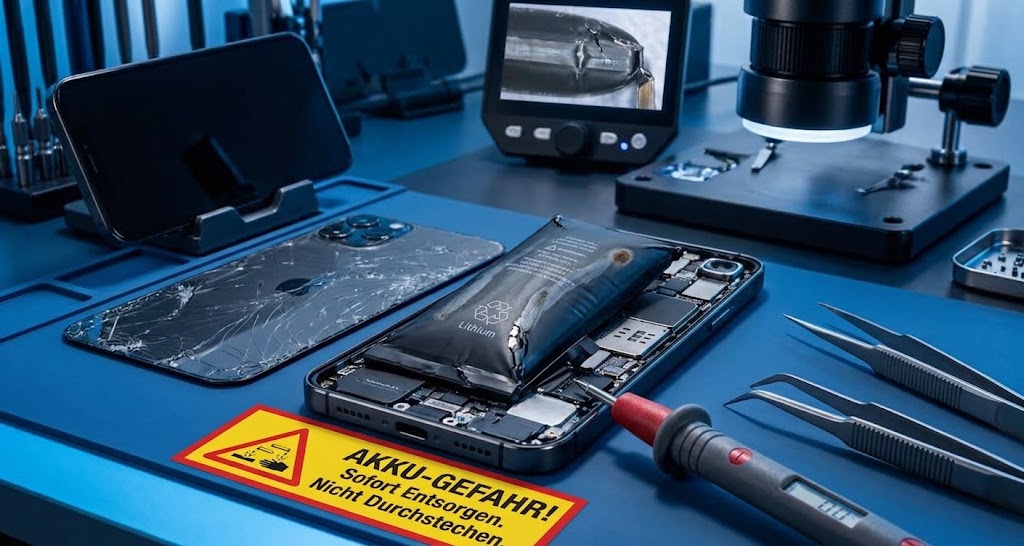
1. Why a smartphone battery can swell
Most modern smartphones use a lithium-ion battery. Charging converts electrical energy into chemical energy; when you use the device, this process runs in reverse.
If the cell's chemistry is disrupted, gases can form inside the battery. The battery swells and may press against the display or the back of the phone.
- Moisture getting inside the device
- Exposure to extreme heat or cold
- Charging problems, for example due to unsuitable chargers or faulty cables
- Deep discharge from prolonged storage with a fully depleted battery
- Material defects or aging
- Physical damage, for example from a drop
2. Warning signs you should take seriously
A damaged battery can reveal itself in several ways. Pay attention not just to battery life, but also to heat, odors, and any changes in the shape of the housing.
- Battery life drops noticeably.
- The smartphone gets unusually warm or stays warm, especially while charging.
- You notice a chemical or sweet smell.
- The display or the back of the phone bulges outward.
- Bright spots or pressure marks appear on the display.
3. What to do immediately if your battery is swollen
If you notice swelling, the first priority is to stop putting any further strain on the device. Even a quick call or a look at your saved data isn't a reason to keep using it.
- Switch the smartphone off completely — standby isn't enough.
- Stop charging the device.
- Don't use it again.
- Don't put the smartphone in your pocket or near flammable materials.
- Contact a qualified repair shop or the manufacturer to discuss the next steps.
Don't attempt to remove the battery yourself
A damaged battery shouldn't lead to a risky DIY repair attempt. The cells can catch fire if they suffer physical damage. If you're unsure how to handle the battery, leave its removal to a qualified professional.
4. Storage and proper disposal
Until you can hand it over to a qualified repair shop or collection facility, keep the affected device in a cool, dry place away from flammable materials. Don't use or charge it again during this time.
5. How to help prevent battery damage
Not every battery fault can be prevented: aging and material defects can also play a role. However, you can take care to charge and store your smartphone under suitable conditions.
- Avoid extreme temperatures, such as direct sunlight, a car dashboard, or a heater.
- Use suitable power adapters and good-quality, undamaged charging cables.
- Be mindful of charging and keep an eye on the device.
- If you won't be using your smartphone for an extended period, store it with around 40 to 60 percent charge rather than a fully depleted battery.
- After a drop, watch for changes in charging behavior and normal use.
6. After a drop: stay alert even if there's no visible damage
An undamaged display doesn't automatically mean the battery is unharmed too. The effects of a drop may only become apparent later.
If battery life drops significantly afterward, the device gets unusually warm, or it shuts down despite showing charge remaining, a professional inspection makes sense. A qualified repair shop can assess the battery's condition and replace it if necessary.
Conclusion: stop using a swollen battery
A swollen phone battery is a serious safety hazard. Switch the device off, stop charging it, and have it professionally inspected. Don't ignore visible distortion — even if the smartphone still works.
If you notice any of the signs described above, you can contact RD-Repairstore in Kuppenheim to discuss the next steps. We'll inspect your battery, replace it professionally if needed, and arrange proper disposal. This article is not a substitute for a professional diagnosis.
RD-Repairstore
Device not working?
We check what is actually damaged and discuss the possible next steps openly with you.
Request a repair